How to publish a CD, 4
After these steps, you can press the “Build” button to create the CD. The program will ask if you want to save the settings in a .wzz file (es. test.wzz) (in this way you can make multiple copies of the same CD without any difficulty).
Then it shows a “test” button, useful to try the install as you was the final user.
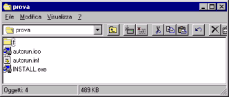
Now if you take a look on C:\test you’ll see these files:
These are all what you need to copy in the root of a CD. You can do this with your usual CD writer software (EasyCD, Nero, WinOnCD...).